
How to Add a Contact Form That Actually Works
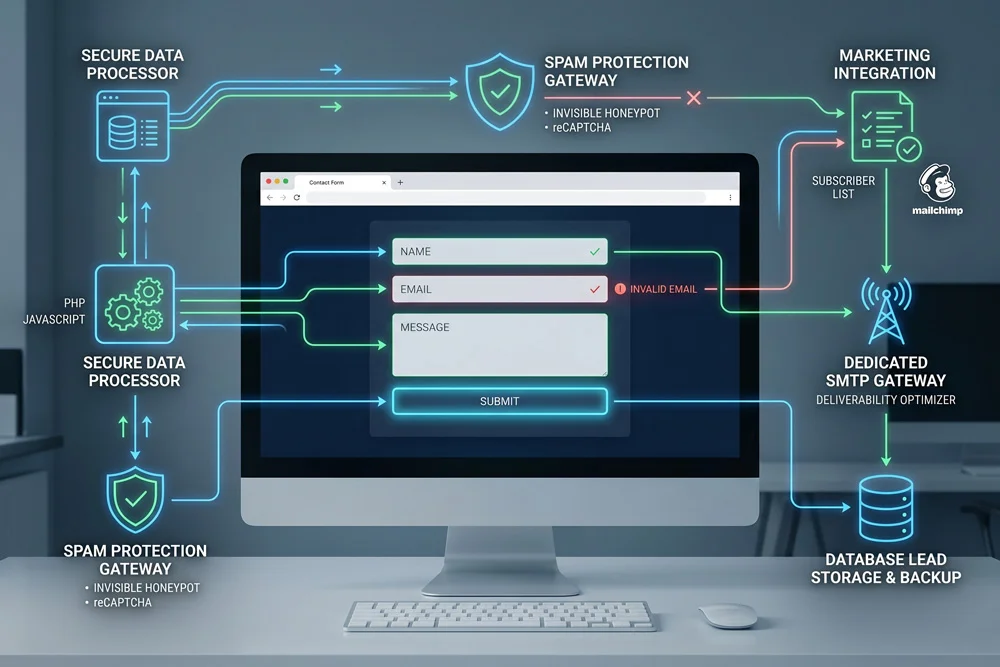
How to Add a Contact Form That Actually Works Edit Template When you set out to add a contact form that actually works, you are taking a crucial step toward establishing direct, reliable communication with your audience. Hello, I am Adnan Ahmad, a WordPress developer with 3+ years of experience[cite: 1]. My agency, Web Design AD, specializes in crafting highly functional websites[cite: 2]. Throughout my career, I have seen countless businesses lose valuable leads simply because their communication gateways were broken or poorly optimized. Building a robust communication portal requires more than just dragging and dropping a generic widget onto a page. To truly succeed, you need a deep understanding of WordPress customization, HTML, CSS, PHP, and JavaScript[cite: 2]. By leveraging these core technologies, you can transform a simple input field into a highly secure, conversion-focused asset. Many site owners feel frustrated when messages fail to deliver or when spam overtakes their inbox. However, by implementing the right technical configurations and design principles, you can eliminate these headaches completely. We will explore the backend setup, essential validation rules, and advanced customization techniques to ensure your digital communication remains flawless. Why You Must Add a Contact Form That Actually Works Today Relying solely on a naked email address displayed on your webpage is a massive security risk. Spambots constantly scrape the internet for exposed email addresses, leading to an overwhelming amount of junk mail. When you add a contact form that actually works, you instantly shield your primary communication channels from automated scrapers. Furthermore, a structured input system allows you to dictate exactly what information you collect. Instead of receiving vague emails, you can require users to specify their budget, project timeline, or specific service needs before they hit the submit button. Professional aesthetics also play a significant role. A well-designed interface builds immediate trust. As a developer, I regularly use my beginner knowledge of Photoshop and Illustrator to map out the visual aesthetics before writing any code[cite: 3]. This preparation ensures the final output aligns perfectly with your brand identity. The Core Mechanics Behind Seamless Lead Capture Pre-packaged form builders often come with unnecessary bloat that slows down your page speed. However, when you understand the underlying mechanics, you can keep your site lightweight and lightning-fast. Clean code is essential for user retention and search engine visibility. HTML provides the structural foundation for your input fields. CSS is then applied to style these elements, ensuring they match your brand colors, typography, and spacing perfectly. I heavily utilize custom CSS to create engaging hover states and smooth transition animations. To process the data securely, PHP handles the server-side operations, securely routing the user’s input directly to your inbox. Simultaneously, JavaScript provides crucial client-side validation, instantly alerting the user if they forget to fill out a required field or enter an invalid email format. Balancing Form Design with High Functionality Visual appeal means nothing if the underlying technology fails. A visually stunning interface must be paired with bulletproof backend routing. To add a contact form that actually works, you must configure your server’s mail protocol correctly. Relying on the default PHP mail function often leads to messages landing straight in the spam folder. Instead, integrating a dedicated SMTP (Simple Mail Transfer Protocol) service ensures high deliverability rates. This technical adjustment guarantees that every client inquiry reaches your primary inbox without delay. Crucial Steps to Add a Contact Form That Actually Works Before launching your communication portal, you must lay a rock-solid technical foundation. Skipping these critical configuration steps often leads to silent failures, where users believe they have sent a message, but you never receive it. The very first requirement is selecting a reliable plugin or writing a custom solution from scratch. If you choose a plugin, ensure it is frequently updated and highly rated within the official WordPress plugin repository. Once the foundation is set, you need to configure your notification settings. You must clearly define which administrative email addresses will receive the alerts and ensure the “Reply-To” headers are dynamically populated with the sender’s email address. Integrating Advanced Spam Protection Protocols Spam submissions are the bane of any website owner’s existence. If you plan to add a contact form that actually works, implementing robust anti-spam measures is absolutely non-negotiable. Avoid relying solely on simple math questions or distorted text captchas, as modern bots can easily bypass them. Instead, utilize invisible honeypot fields. These are hidden input fields that human visitors cannot see, but automated bots will instinctively fill out. If a honeypot field contains any data upon submission, your server instantly rejects the message. This method dramatically reduces spam without adding any friction to the legitimate user’s experience. Implement invisible honeypots to trap automated spambots silently. Configure advanced reCAPTCHA to analyze user behavior without requiring puzzle-solving. Set strict input limitations to prevent malicious code injections. Connecting Your Inputs to Email Marketing Campaigns Every submitted message represents a potential long-term relationship. Capturing these inquiries and seamlessly funneling them into your marketing ecosystem maximizes your return on investment. I know how to create Mailchimps integrations that directly connect your submission fields to your primary subscriber lists[cite: 3]. By adding a simple, transparent opt-in checkbox, you can rapidly grow your audience while handling daily inquiries. Once connected, you can automate your responses. A user who requests a quote can instantly receive an automated welcome sequence, introducing them to your brand values and showcasing your previous portfolio work while they wait for your personalized reply. Structuring Fields for Optimal User Experience Long, exhaustive questionnaires intimidate users. If your input fields look like a rigorous exam, your conversion rates will plummet. You must strike a delicate balance between gathering necessary data and maintaining a frictionless user experience. Only ask for information you truly need to initiate the conversation. A name, email address, and a brief message area are often sufficient for initial inquiries. You can always gather more detailed project specifications during a follow-up discovery call. If you absolutely must collect extensive details, consider